Loop Pipeline (Iterate Over a Collection)
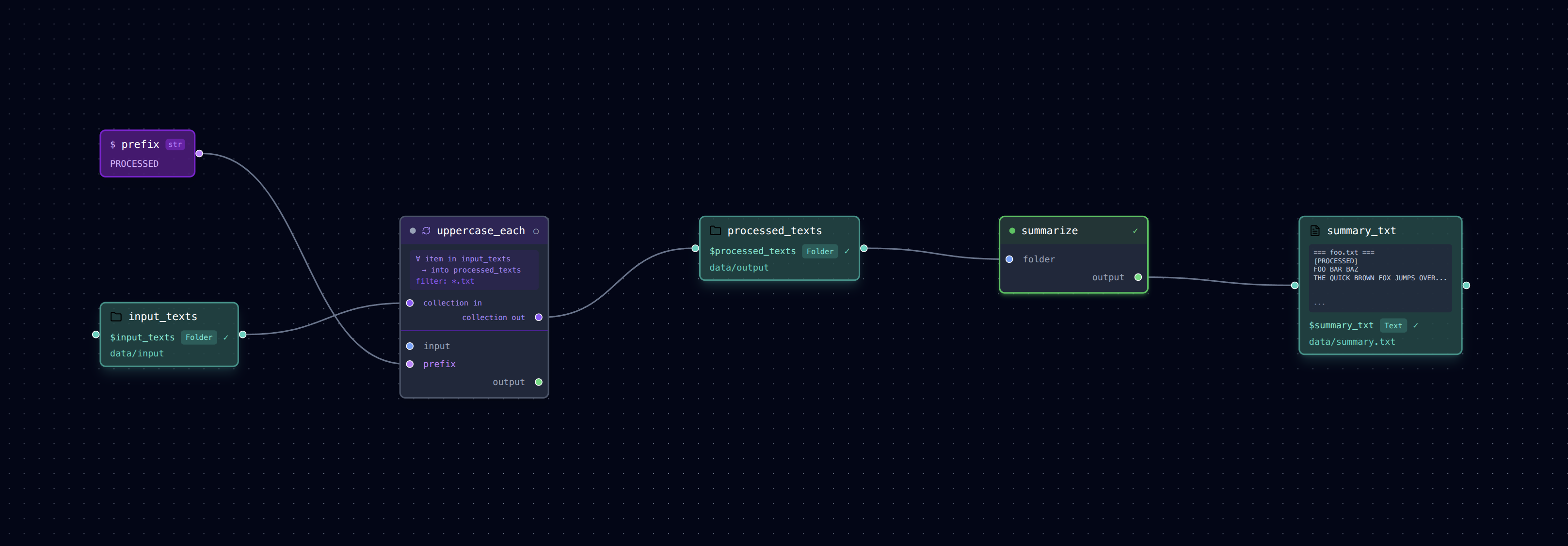
Running the same task for every file in a directory — without writing a single loop in Python.
input_texts/ ──► uppercase_each (∀ item) ──► processed_texts/
                                                  │
                                                  ├─⊂ hello_processed ──► count_hello ─────────► hello_report.json
                                                  └─⊂ greet_processed ──► extract_greet_line ──► greet_line.txt
What It Does
This example introduces the loop: block — a first-class primitive for iterating over
every file in a data folder — and shows how a produced directory feeds several branches
through its nested files.
- uppercase_each: Loops over every
.txtfile indata/input/, uppercases its contents, and writes each result tooutput/processed/(preserving filename). - processed_texts is the produced directory. It is a pure container: no step consumes it directly.
- Two files are pulled out of it as nested data nodes
(
hello_processed,greet_processed, eachnested_in: $processed_texts) and each drives a different branch: - count_hello →
hello_report.json(word/line counts) - extract_greet_line →
greet_line.txt(first line)
Because the nested files inherit the container's producer, each branch is correctly
ordered after uppercase_each, and the editor draws a ⊂ inside edge from
processed_texts to each extracted file — so the files are the actors connecting the
DAG, not detached leftovers.
Run It
# Run the pipeline
loom examples/loop/pipeline.yml

# Check per-item outputs in the container
ls examples/loop/output/processed/

# Each branch reads one specific file from that container
cat examples/loop/output/hello_report.json
cat examples/loop/output/greet_line.txt

# Open in the visual editor
loom-ui examples/loop/pipeline.yml
The Loop Block
The key addition is the loop: block on a step:
- name: uppercase_each
  task: tasks/uppercase.py
  loop:
    over: $input_texts     # data_folder to iterate over
    into: $processed_texts # data_folder where per-item outputs land
    filter: "*.txt"        # optional glob filter
  inputs:
    input: $loop_item      # reserved: path of the current file
  outputs:
    --output: $loop_output # reserved: corresponding path in `into`
  args:
    --prefix: $prefix
Two reserved variables are available inside a loop step:
| Variable | Meaning |
|---|---|
$loop_item |
Absolute path of the current file being processed |
$loop_output |
Corresponding output path in the into folder (same filename) |
Rather than consuming the whole into folder, downstream steps can pull specific files
out of it with nested_in. Each extracted file behaves like any other data node and
becomes an explicit edge in the DAG:
data:
  processed_texts:
    type: data_folder
    path: output/processed
  hello_processed:
    type: txt
    path: hello.txt            # relative to the container
    nested_in: $processed_texts

pipeline:
  - name: count_hello
    task: tasks/word_count.py
    inputs:
      text: $hello_processed
    outputs:
      --output: $hello_report
Pattern: Fan-Out From a Directory
Produce a directory once, then fan out into independent branches by extracting the files each branch needs:
- Render every frame of a clip, then branch on specific frames
- Generate one artifact per sample, then analyze several of them differently
- Split a dataset into shards, then train/evaluate on distinct shards
To run loop iterations concurrently, add parallel: true to the loop block.
Files
pipeline.yml— Loop pipeline definitiontasks/uppercase.py— Reads a text file, writes an uppercased version (loop body)tasks/word_count.py— Counts words/lines of one extracted file → JSONtasks/first_line.py— Extracts the first line of one extracted file → textdata/input/— Sample text files (foo.txt,greet.txt,hello.txt)