Optional Steps Example
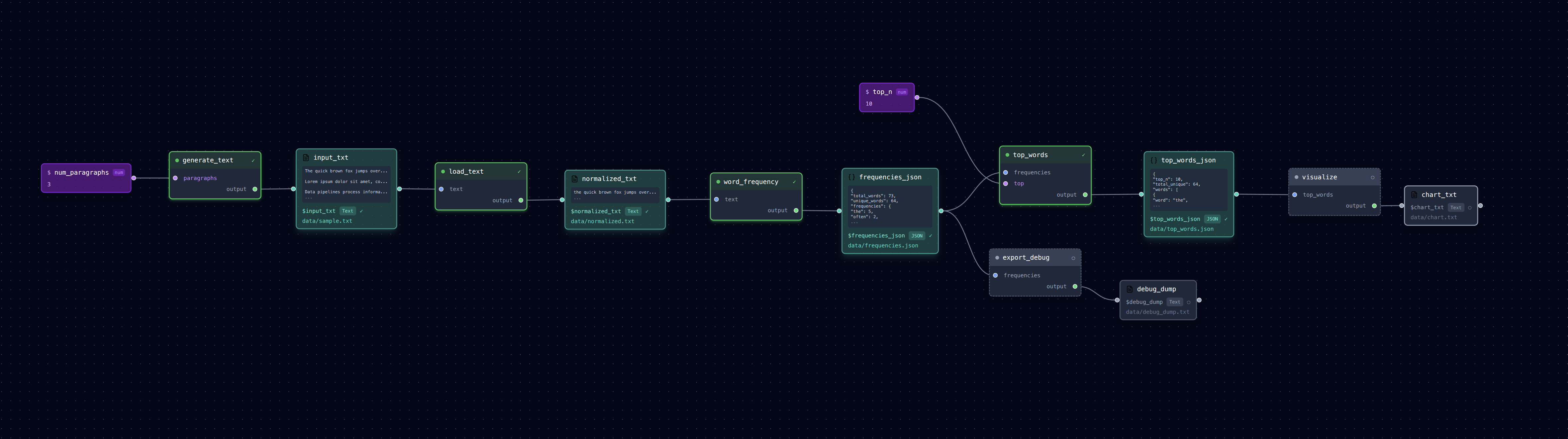
Using optional steps for debug output and visualization that you don't always need.
What It Does
A text processing pipeline that: 1. load_text: Reads input text file 2. word_frequency: Counts word occurrences 3. top_words: Extracts most common words 4. export_debug (optional): Dumps full frequency data for debugging 5. visualize (optional): Creates ASCII bar chart of top words
Optional steps are skipped by default but can be included with --include.
Run It
# Run main pipeline (skips optional steps)
loom examples/optional_steps/pipeline.yml

# Check outputs
cat examples/optional_steps/data/frequencies.json    # Word counts
cat examples/optional_steps/data/top_words.json      # Top 10 words

# Include the debug export
loom examples/optional_steps/pipeline.yml --include export_debug
cat examples/optional_steps/data/debug_dump.txt

# Include visualization
loom examples/optional_steps/pipeline.yml --include visualize
cat examples/optional_steps/data/chart.txt

# Include both optional steps
loom examples/optional_steps/pipeline.yml --include export_debug --include visualize

# Open in editor (optional steps shown with dashed borders)
loom-ui examples/optional_steps/pipeline.yml
Files
pipeline.yml— Pipeline with optional steps markedtasks/load_text.py— Loads and normalizes texttasks/word_frequency.py— Counts word occurrencestasks/top_words.py— Extracts top N wordstasks/export_debug.py— (Optional) Full debug dumptasks/visualize.py— (Optional) ASCII bar chartdata/sample.txt— Sample input text