Loop Pipeline (Iterate Over a Collection)
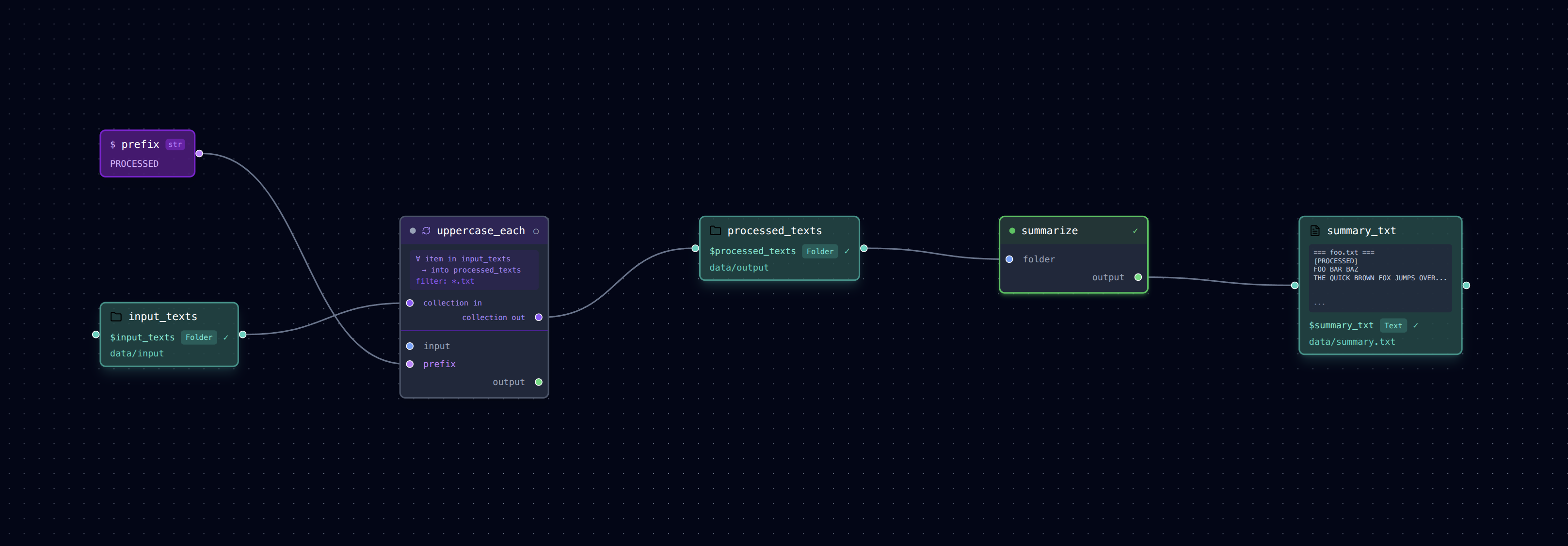
Running the same task for every file in a directory — without writing a single loop in Python.
What It Does
This example introduces the loop: block — a first-class primitive for iterating over
every file in a data folder.
- uppercase_each: Loops over every
.txtfile indata/input/, uppercases its contents, and writes each result todata/output/(preserving filename). - summarize: Reads the whole
data/output/folder and concatenates all files into a singledata/summary.txt.
The loop is declared entirely in YAML — no wrapper script needed.
Run It
# Run the pipeline
loom examples/loop/pipeline.yml

# Check per-item outputs
ls examples/loop/data/output/
cat examples/loop/data/output/foo.txt

# Check the aggregated summary
cat examples/loop/data/summary.txt

# Open in the visual editor
loom-ui examples/loop/pipeline.yml
The Loop Block
The key addition is the loop: block on a step:
- name: uppercase_each
  task: tasks/uppercase.py
  loop:
    over: $input_texts     # data_folder to iterate over
    into: $processed_texts # data_folder where per-item outputs land
    filter: "*.txt"        # optional glob filter
  inputs:
    input: $loop_item      # reserved: path of the current file
  outputs:
    --output: $loop_output # reserved: corresponding path in `into`
  args:
    --prefix: $prefix
Two reserved variables are available inside a loop step:
| Variable | Meaning |
|---|---|
$loop_item |
Absolute path of the current file being processed |
$loop_output |
Corresponding output path in the into folder (same filename) |
Downstream steps consume the into folder exactly like any other data node — they don't
need to know it was populated by a loop.
Pattern: Per-Item Processing
Use loop: whenever a step should run once per file:
- Resize every image in a directory
- Extract features from each audio clip
- Run inference on each sample in a dataset
To run iterations concurrently, add parallel: true to the loop block.
Files
pipeline.yml— Loop pipeline definitiontasks/uppercase.py— Reads a text file, writes uppercased versiontasks/summarize.py— Concatenates a folder of files into one summarydata/input/— Sample text files (foo.txt,greet.txt,hello.txt)