Image Processing Pipeline
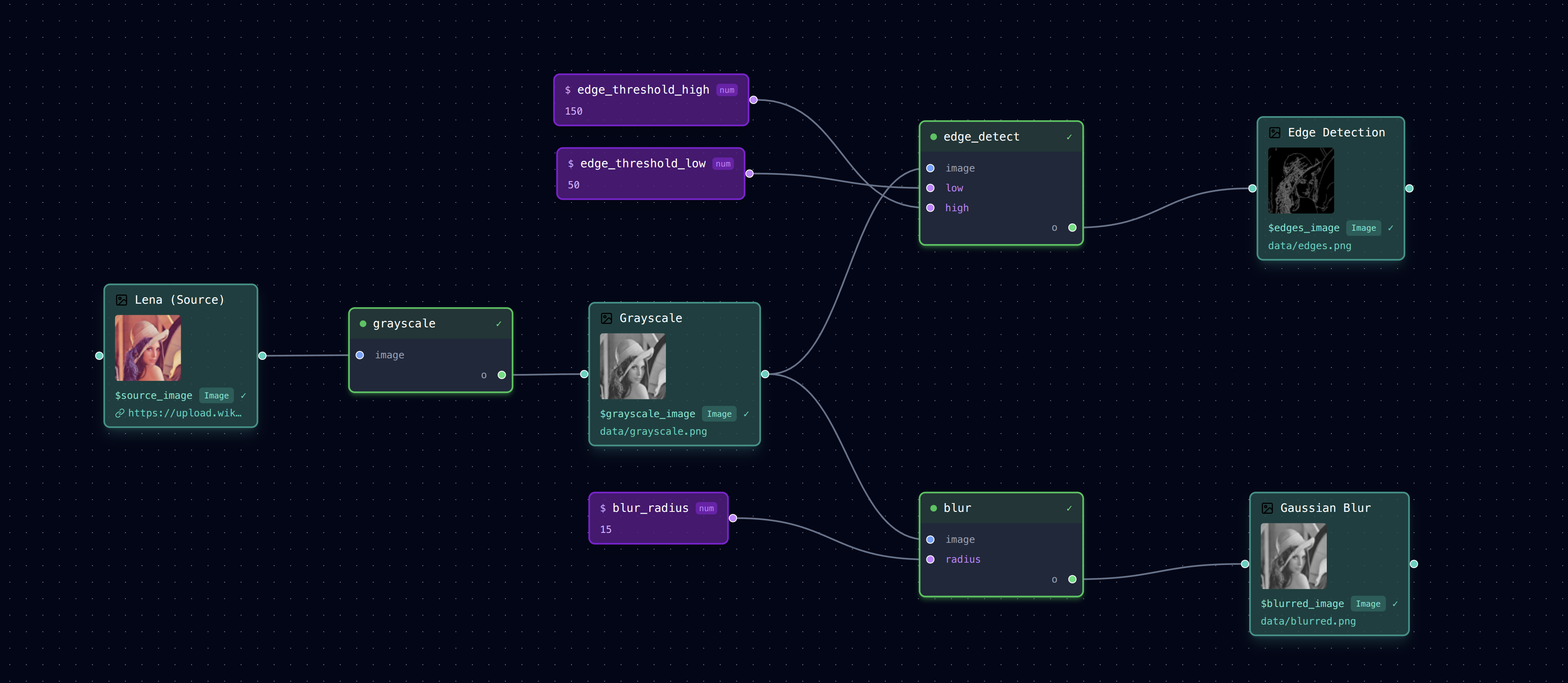
This example demonstrates URL data sources and basic image processing with OpenCV.
What This Example Shows
- URL as Data Source - The source image is loaded directly from a URL (Wikipedia's Lenna test image)
- Automatic Caching - URL resources are downloaded and cached in
.loom-url-cache/ - Branching Pipeline - Grayscale output feeds into two parallel processing steps
- Image Thumbnails - The visual editor shows thumbnails for each image
Pipeline Structure
Running the Example
# Navigate to the example directory
cd examples/image-processing

# Run the pipeline
loom examples/image-processing/pipeline.yml

# Or run the full pipeline
loom examples/image-processing/pipeline.yml --all
First run will download the image from Wikipedia and cache it locally. Subsequent runs use the cached version.
Tasks
| Task | Description | Input | Output |
|---|---|---|---|
grayscale.py |
Convert to grayscale | Color image | Grayscale image |
edge_detect.py |
Canny edge detection | Grayscale image | Edge image |
blur.py |
Gaussian blur | Any image | Blurred image |
Parameters
| Parameter | Default | Description |
|---|---|---|
blur_radius |
15 | Blur kernel size (pixels) |
edge_threshold_low |
50 | Canny low threshold |
edge_threshold_high |
150 | Canny high threshold |
Clearing the URL Cache
To re-download the source image:
This removes both the generated outputs and the URL cache directory.
Dependencies
- OpenCV (
opencv-python-headlessoropencv-python)
Install with:
Or install all example dependencies: