Groups (Visual Step Grouping)
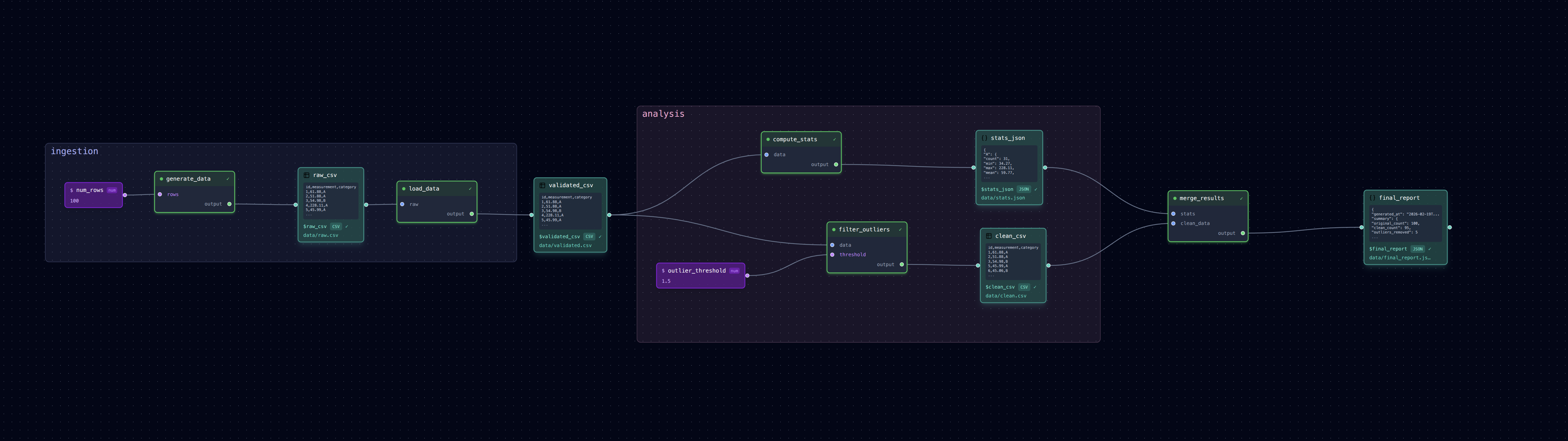
Organize related steps into named groups for a cleaner visual layout in the editor.
What It Does
Groups are a purely visual/organizational feature — they don't affect execution order or
logic. Steps inside a group: block behave identically to ungrouped steps, but in
loom-ui they're drawn inside a colored rectangle so you can see which steps belong
together at a glance.
This example takes the diamond pipeline and wraps its steps into two groups:
- ingestion:
generate_dataandload_data— the data acquisition phase. - analysis:
compute_statsandfilter_outliers— the parallel analysis branches. merge_resultsis left ungrouped as the final reporting step.
Run It
# Run from the command line (works identically to a flat pipeline)
loom examples/groups/pipeline.yml

# Open in the visual editor to see the group rectangles
loom-ui examples/groups/pipeline.yml
The Group Block
The group: block wraps one or more steps inside a named block:
pipeline:
  - group: ingestion
    steps:
      - name: generate_data
        task: tasks/generate_data.py
        outputs:
          --output: $raw_csv
        args:
          --rows: $num_rows

      - name: load_data
        task: tasks/load_data.py
        inputs:
          raw: $raw_csv
        outputs:
          --output: $validated_csv

  - group: analysis
    steps:
      - name: compute_stats
        task: tasks/compute_stats.py
        inputs:
          data: $validated_csv
        outputs:
          --output: $stats_json

      - name: filter_outliers
        task: tasks/filter_outliers.py
        inputs:
          data: $validated_csv
        outputs:
          --output: $clean_csv
        args:
          --threshold: $outlier_threshold

  # Ungrouped steps still work
  - name: merge_results
    task: tasks/merge_results.py
    inputs:
      stats: $stats_json
      clean_data: $clean_csv
    outputs:
      --output: $final_report
Key Points
- Groups are YAML-only — there's no UI interaction for creating or modifying them. Edit the YAML to add/change groups.
- Groups are visual-only — they don't change execution order, dependency resolution, or parallelism.
- In loom-ui, each group gets a semi-transparent colored rectangle drawn behind its member nodes, with a label that stays the same screen size regardless of zoom level.
- The Auto Layout button clusters grouped steps together using Dagre's compound graph feature.
- Ungrouped steps and grouped steps can be freely mixed in the same pipeline.
When to Use Groups
- Pipelines with 5+ steps where logical phases become hard to see.
- Separating data acquisition, processing, and reporting phases.
- Marking experimental branches or optional sub-workflows.
Files
pipeline.yml— Pipeline withgroup:blockstasks/— Same task scripts as the diamond example